
OBD Adapters for TrackTune: Classic Bluetooth Only
TrackTune connects to OBD adapters that use classic Bluetooth and answer ELM327 commands. The OBDLink MX+ is the recommended adapter. Others of that kind, such as the Vgate vLinker and Veepeak OBDCheck BLE+ families, are expected to work, and setup runs an adapter test that confirms what yours can read. Adapters that only use Bluetooth LE, Wi-Fi or USB can’t connect to the head unit.
An adapter is optional. TrackTune’s dashboards, lap timing and USB recording run on the data the head unit already receives, with no adapter. The adapter adds readings the head unit doesn’t get on its own: tire pressure and tire sensor temperature for each wheel, an oil temperature estimate, lambda, fuel rail pressure, ignition advance, mass airflow, throttle position and long-term fuel trim. The Meters data reference describes each one.
At a glance
Section titled “At a glance”| Adapter | Status |
|---|---|
| OBDLink MX+ | Recommended |
| OBDLink LX, OBDLink MX Bluetooth | Expected to work |
| Vgate vLinker MC, MC+, FD, FD+, BM, BM+ | Expected to work |
| Vgate iCar Pro BT3.0, BLE 4.0, 2S | Expected to work |
| Veepeak OBDCheck BLE+, VP11 | Expected to work |
| Generic ELM327 Bluetooth adapters | Varies by unit. The adapter test shows what yours can read |
| OBDLink CX | Can’t connect. Bluetooth LE only |
| Dragy OBD II | Can’t connect. Bluetooth LE only |
| OBDeleven NextGen, OBDeleven 3 | Can’t connect. Bluetooth LE only |
| Any Wi-Fi or USB adapter | Can’t connect |
Recommended: OBDLink MX+
Section titled “Recommended: OBDLink MX+”The OBDLink MX+ is the adapter TrackTune’s OBD support was developed and driven with. It reads every engine and tire reading TrackTune offers.
It also switches to MS-CAN, so the same adapter handles FORScan.
Expected to work: classic Bluetooth ELM327 adapters
Section titled “Expected to work: classic Bluetooth ELM327 adapters”The head unit talks to the adapter directly over a classic Bluetooth serial connection, with no phone involved. Any adapter that offers that connection and answers ELM327 commands can pair. Setup doesn’t check the brand.
- OBDLink LX and the discontinued OBDLink MX Bluetooth. The LX uses the same chip family as the MX+.
- Vgate vLinker MC, MC+, FD, FD+, BM, BM+. Vgate describes the MC+ as “based on Bluetooth 3.0 (Android and Windows)” with Bluetooth LE added for iOS.
- Vgate iCar Pro BT3.0, BLE 4.0 and 2S. The BLE 4.0 and 2S models show two devices. Choose
Android-Vlinkin the car, with PIN1234. - Veepeak OBDCheck BLE+. Veepeak lists it with both classic Bluetooth and Bluetooth LE.
- Veepeak OBDCheck VP11 (Mini Bluetooth). Classic Bluetooth, PIN
1234.
Generic ELM327 adapters
Section titled “Generic ELM327 adapters”The low-cost adapters sold as “ELM327 v1.5” or “v2.1” vary from unit to unit, even under the same listing. Some read everything. Others read standard engine data and can’t reach the instrument cluster, where the tire readings live. The adapter test shows which kind you have.
The adapter test reports what your adapter can read
Section titled “The adapter test reports what your adapter can read”After pairing, setup runs a read-only test with the ignition on. It usually takes less than a minute, and the screen then shows one of three results:
| Result on screen | Meaning |
|---|---|
| Your adapter is working | Engine and tire readings work. The screen shows live tire pressures |
| Working, with engine data only | Standard engine readings work, with no tire pressure or tire temperature |
| This adapter isn’t compatible | The adapter doesn’t answer the commands TrackTune needs |
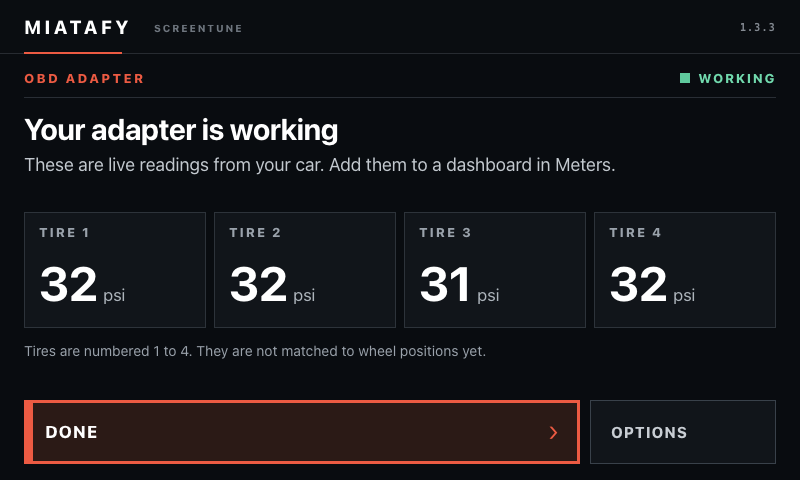
Two other screens mean the test couldn’t finish. The car did not answer means the ignition was off. Can’t reach your adapter means the adapter is unplugged, asleep, or blocked by wireless CarPlay. Fix that and choose Try again.
Send us your result
Section titled “Send us your result”If your adapter gets any result other than Your adapter is working, choose Export support bundle on the Miatafy app’s home screen with a USB stick plugged in, and email the bundle to support@miatafy.com with the adapter’s exact model name.
Can’t connect: Bluetooth LE, Wi-Fi and USB
Section titled “Can’t connect: Bluetooth LE, Wi-Fi and USB”Mazda’s head unit connects to accessories over classic Bluetooth only. An adapter that only uses Bluetooth LE doesn’t appear in the car’s search.
- OBDLink CX. Bluetooth LE only.
- Dragy OBD II. Bluetooth LE only.
- OBDeleven NextGen and OBDeleven 3. Bluetooth LE only, and made for OBDeleven’s own apps.
- Wi-Fi adapters, including the Wi-Fi versions of models listed above.
- USB adapters.
Limits during the beta
Section titled “Limits during the beta”- Wireless CarPlay. The adapter doesn’t connect while wireless CarPlay is connected. Disconnect wireless CarPlay to use it.
- Tire positions. Tire readings are numbered 1–4 and aren’t labeled by wheel position yet.
- Tire pressure. Keep using a gauge to set pressures while the feature is in beta.
- Refresh rate. The adapter answers one request at a time, so OBD readings update about once a second at best. Mass airflow, throttle position and fuel trim wait behind the others and can take a few seconds on a dashboard with many OBD readings.
- Air-fuel ratio. The AFR readings are lambda multiplied by 14.7, which is right for petrol only. On a diesel or another fuel, use lambda.
- Recording. OBD readings record to the USB stick as raw JSONL. They aren’t columns in the CSV, VBO or RaceChrono files.
- Firmware. The installer accepts Mazda Connect 74.00.324A only.
Which adapter to buy
Section titled “Which adapter to buy”The straightforward choice: the OBDLink MX+.
You already own a classic Bluetooth adapter: try it. Pairing and the adapter test take a few minutes and show what it can read.
You want to spend less: look at the OBDLink LX, a vLinker, or the Veepeak OBDCheck BLE+, and run the adapter test when it arrives.
You own a Bluetooth LE, Wi-Fi or USB adapter: it works with phone apps as before and can’t be used with TrackTune. See OBD adapters and apps for the ND MX-5 for phone apps.
Set it up
Section titled “Set it up”The adapter option is a beta add-on named Bluetooth OBD adapter, off by default. Select it in the Beta group of the Add-ons step under Change features in My ScreenTune, then install the package it builds. The pairing PIN choice and the adapter test need ScreenTune 1.3.3 or later.
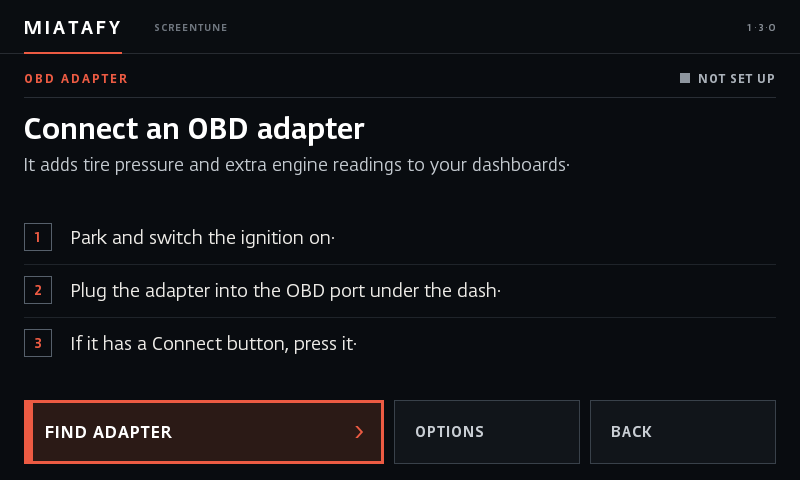
- Park, switch the ignition on, and plug the adapter in. If it has a Connect button, as the MX+ does, press it.
- Open the Miatafy app on the car’s screen and choose OBD adapter.
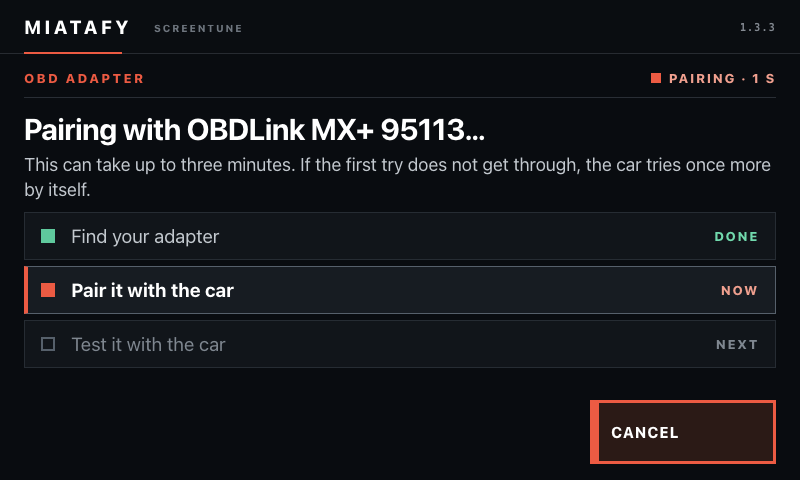
- Choose Find adapter and select yours when it appears. Devices whose names look like OBD adapters are listed first. If the car shows a pairing code, choose Yes, pair it only for your own adapter.
- Wait while the car pairs with the adapter and tests it. Pairing can take up to three minutes: if the first try doesn’t get through, the car tries once more by itself.
- When the screen reads Your adapter is working, the tire pressures on it are live. Add OBD readings to a dashboard in Meters.
Adapters that ask for a PIN
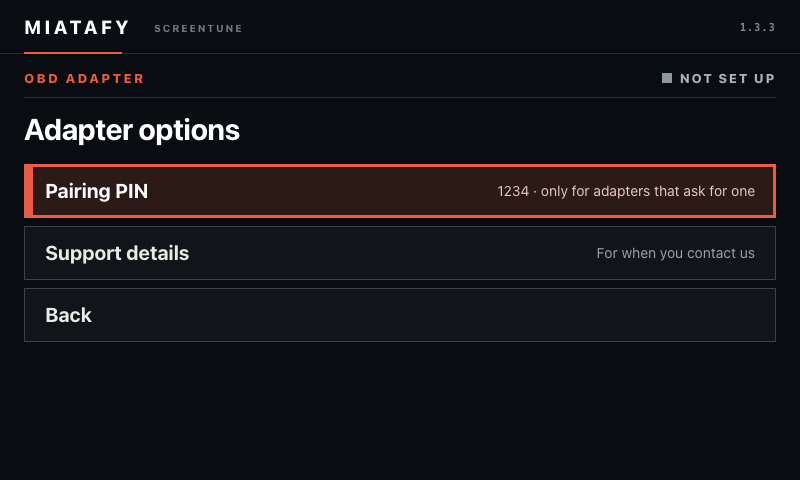
Section titled “Adapters that ask for a PIN”OBDLink adapters pair without a PIN. For an adapter that asks for one, choose Options, then Pairing PIN, before you search. It starts at 1234, which most ELM327 adapters use. Some use 0000, and the adapter’s instructions name any other.
If the screen says the adapter did not accept the PIN, choose Try PIN 0000 or Other PIN and select the adapter again.
After setup
Section titled “After setup”The adapter connects by itself whenever a dashboard shows an OBD reading. Opening OBD adapter again shows the live tire pressures, or what is stopping them.
- Options holds Test adapter again, Support details and Forget adapter.
- Pair your adapter again means the car has lost its pairing with the adapter. Choose Find adapter and select it once more.
- Waiting for the car’s Bluetooth means the head unit is busy with its own connections. The adapter is fine, and the car keeps trying.
The ND MX-5 OBD PID list covers the requests an ND MX-5 answers.