
The Two Car-Icon Dash Buttons: DSC OFF and Lane Departure
The switch panel on the lower dash, left of the steering wheel, carries up to six buttons, and the two that confuse people both show a little car icon. The car with wavy skid lines and the word OFF is the DSC OFF switch: it turns off traction control and stability control. The car drifting across a lane line is the Lane Departure Warning System (LDWS) OFF switch: it silences the lane departure beep. They sit inches apart and look related, but one changes how the car behaves at the limit of grip and the other just stops a noise.
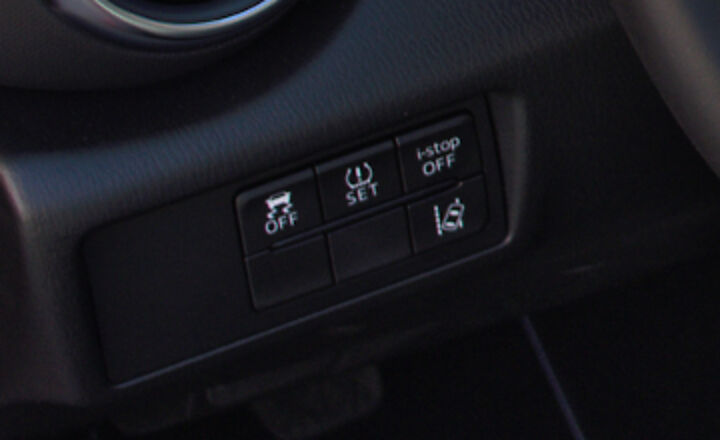
DSC OFF turns off traction and stability control together
Section titled “DSC OFF turns off traction and stability control together”On the MX-5, DSC OFF disables both systems at once. On 2016–2023 cars it takes one press; the owner’s manual states it directly: “Press the DSC OFF switch to turn off the TCS/DSC. The DSC OFF indicator light in the instrument cluster will illuminate.” On 2022+ cars the same press also disables Kinematic Posture Control, the brake-based body-control system Mazda added that year. On 2024+ cars you hold the switch with the car stopped until it chimes. Either way, press it again to turn everything back on.
This is a real difference from other Mazdas. On a Mazda3 or CX-5, a short press typically disables traction control only. The MX-5 has no traction-only setting: it gives you the whole package at once, so treat the button with more respect in this car than in the family crossover.
Two behaviors catch people out:
- It resets every start. Turn the car off with DSC disabled and it comes back on at the next ignition cycle, per the manual.
- Holding it 10 seconds does not turn off “more.” On 2016–2023 cars the manual says a 10-second hold trips a malfunction-detection function that turns DSC back on. On 2024+ cars it locks everything on until you restart. The hold-for-full-off trick from other cars does not exist here.
The full ND button behavior by year, including the 10-second-hold myth and the 2024+ Club’s DSC-TRACK switch, is on the DSC OFF button page. For what TCS, DSC, and KPC each actually do and when to turn them off for autocross, track, or snow, see driving the ND with DSC off.
The lane departure button silences a beep, nothing more
Section titled “The lane departure button silences a beep, nothing more”On 2016–2023 cars, LDWS watches lane markings through the windshield camera and, per the owner’s manual, “notifies the driver by flashing the LDWS warning light and activating the LDWS warning beep.” There is no steering intervention on these cars; actual Lane-keep Assist arrived with the 2024 ND3. The system arms at about 40 mph (64 km/h) and stands down when you signal a lane change or make an abrupt steering, brake, or throttle input.
Owners press this button because the system false-triggers constantly on real roads: pavement seams, tar patches, and ghost lines from old lane layouts all read as departures. One press turns it off, and owner reports are consistent that the setting survives ignition cycles, so it stays off once you turn it off. Mazda’s manuals do not state the persistence explicitly, but a service-manual button diagram and years of forum reports back it up.
On the 2024+ ND3 the physical button is gone. Lane departure is toggled in Mazda Connect under Settings, per the 2024 manual, and the steering-wheel mute switch silences the warning sound. ND3 owners hunting the dash for the old button are looking for something that is not there.
Blank buttons mean the option is not on your car
Section titled “Blank buttons mean the option is not on your car”The panel is a shared part with positions for every option the model can carry, so lower trims get blanks. A 2016–2019 Sport without the i-ACTIVSENSE package has no LDWS button, just a filler cap where it would sit. Blind-spot-monitoring and other market-specific switches (the i-stop OFF and TPMS SET buttons in the photo above are European) fill or empty the remaining slots by trim, year, and market. “Why are half my buttons blank” is a perennial owner question, and the answer is just option packaging, not missing hardware waiting to be enabled.
Related pages
Section titled “Related pages”- ND DSC OFF button behavior: the one-press interface, the hold myth, and DSC-TRACK activation
- Driving the ND with DSC off: what each system does and when to turn it off
- Dashboard warning lights: the DSC/TCS and DSC OFF cluster lights these buttons trigger
- Disable Mazda i-stop: the other dash OFF button, on models that have it
- ND trim comparison: which trims and years carry which i-ACTIVSENSE equipment