
Download Your ScreenTune Package Again
Every package built for your car stays in My ScreenTune. Download it again whenever you need a new USB, for example after losing the drive, reformatting it, or letting the delivery email’s link expire.
- Sign in to My ScreenTune. If you have more than one car, choose it in Your Mazda.
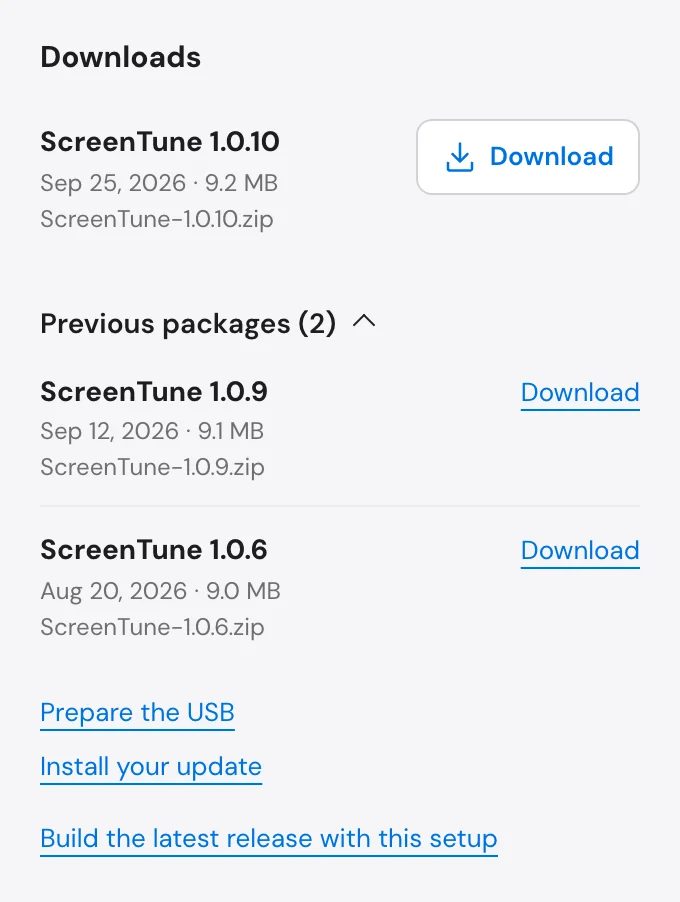
- In the Downloads panel, select Download next to the top package. The browser saves
ScreenTune-<version>.zip. - Prepare the USB drive: unzip the file and copy its contents to the top level of an 8–32 GB FAT32 drive.
- Use the drive in the car. The prompt offers INSTALL on a car without ScreenTune, UPDATE when the package is a different version from the installed one, and REPAIR when it is the same version. See Install ScreenTune, Update ScreenTune, or Repair ScreenTune.
Install the top package
Section titled “Install the top package”Each row shows the ScreenTune version, that version’s release date, the file size, and the file name. The top row is the newest package built for this car and carries your latest setup.
Previous packages lists the older ones with a count, for example Previous packages (2). Use the top package unless support asks for an earlier one.
While a new package is building, the top row is still your previous setup and the panel says This package has your previous setup. The new one will appear here. Wait for the new row; see follow the build.
One package does every job for its car
Section titled “One package does every job for its car”Each download is a complete ScreenTune package for this car’s VIN and the setup it was built with. The same USB installs, repairs, and removes that version, so one download replaces a lost USB in every role. Orders with a mailed USB get the download too.
The package works only in the car it was built for. In another car it stops with This ScreenTune package is licensed to a different vehicle. and changes nothing.
The email link expires; My ScreenTune does not
Section titled “The email link expires; My ScreenTune does not”The delivery email’s download link lasts seven days. After that, download from My ScreenTune, where the package stays listed while your license is active. Each Download click makes a fresh, short-lived link, so select Download again each time instead of saving the link.
Keep a copy of the ZIP on your computer as well as on the USB. The support policy asks customers to retain their own copy.
When a download is missing or fails
Section titled “When a download is missing or fails”| What you see | What to do |
|---|---|
| No downloads here yet. Contact support if you need your original package again. | Email support@miatafy.com with the email address on your order. An inactive license also lists no downloads. |
| Your order is with us. and no car | Your first package is still being prepared. Its email arrives when it is ready. |
| This download is not available for your license. | Reload My ScreenTune and try again. If it repeats, contact support. |
| Your download is temporarily unavailable. Please contact support. | Wait a few minutes and try again, then contact support if it repeats. |
| The car shows no ScreenTune prompt from the new USB | Check the drive against USB requirements, then see no prompt appears. |