
CX-5 CarPlay & Android Auto by Year
The CarPlay table below is for United States trims. The original Mazda Connect system continued to different dates elsewhere: Canada through 2021.0, Mexico through 2023, and selected Australian and continental European trims after the US cutoff. Use the CX-5 country and trim matrix first on an imported or non-US car.
Retrofit walkthroughs on video
Section titled “Retrofit walkthroughs on video”The retrofit is a console teardown to seat the USB hub behind the dash, and the CX-5 trim removal is the part people want to see before they start. Most of these walkthroughs cover the 7-inch Gen 6 KF car; the Greg F. Pettus video is a general Mazda Connect hub install that applies to the same CMU.
 23:12 2017 - 2018 Mazda CX-5 Android Auto/Apple CarPlay Installation Watch on YouTube ↗
  6:02 New Mazda Android Auto/Car Play Install Part 1 Watch on YouTube ↗
 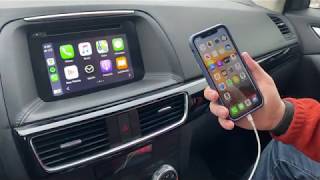 16:41 DIY Apple CarPlay & Android Auto install on Mazda CX-5 2016.5 Watch on YouTube ↗
  14:24 Mazda CX-5 Apple CarPlay/Android Auto upgrade! EASY!! Watch on YouTube ↗
 Counts are Reddit mentions; see how we count.
Factory CarPlay by model year
Section titled “Factory CarPlay by model year”| Model year | Screen | CarPlay from factory? | Notes |
|---|---|---|---|
| 2016 (KE facelift) | 7” | No | First Gen 6 year. Retrofit works on Mazda Connect cars; some 2016 builds carry the older TomTom unit (no square app tiles), which has no CarPlay path. |
| 2017 (KF) | 7” | No | First Gen 6 KF year. Retrofit required. |
| 2018 | 7” | Late builds only | Most need the retrofit; some late-production units reportedly shipped with it. |
| 2019 | 7” | Touring and up | Sport trim does not include CarPlay. |
| 2020 | 7” or 8” touch | Touring and up | Same trim split as 2019; Grand Touring Reserve and Signature got the 8” touchscreen. |
| 2021+ | 10.25” | Yes | Newer system in the United States. Out of scope here. |
The dividing line is the CMU, not the badge. This US table does not determine factory CarPlay timing or platform generation in another market.
Check the armrest USB port and Settings > Devices
Section titled “Check the armrest USB port and Settings > Devices”- Look for a USB-A port in the center armrest (not the front-cubby port). That port feeds the CarPlay hub.
- In the CMU, open Settings > Devices. If an Apple CarPlay entry exists, the hardware is present.
- No menu means either no hub hardware or firmware too old to expose it. Check your firmware version first.
Retrofit for 7-inch cars without it
Section titled “Retrofit for 7-inch cars without it”The OEM kit adds CarPlay and Android Auto to Gen 6 KF cars that shipped without it, most commonly 2017–2020. It includes the USB hub module, a USB-A port with harness, and instructions. The USB hub itself is part TK78-66-9U0C; the genuine Mazda accessory kit is 00008FZ34. Numbers vary by region and supersession, so confirm fitment for your VIN against the CarPlay retrofit guide. TomTom-equipped 2016 cars are not on this retrofit path.
After install, the firmware must carry the CarPlay stack (roughly v70 or later) for CarPlay to come up. Update before connecting the hub, since the hub changes the USB topology and can block a normal USB update afterward. See CX-5 firmware for the exact version floor and the firmware update procedure.
CX-5-specific quirks
Section titled “CX-5-specific quirks”- 7-inch (Gen 6; 2016–2020 in North America): Touch works in CarPlay normally. This is the standard Gen 6 display.
- 8-inch (2020 Grand Touring Reserve and Signature): A touchscreen like the 7-inch, on the same CMU board and firmware; only the panel differs. See 2016–2020 infotainment.
- Wireless: Gen 6 has no native wireless CarPlay. It requires an aftermarket adapter. Behavior and startup time are the same as every other Gen 6 car, covered on wireless CarPlay adapters and wireless CarPlay speed.
- Dual phones: Only one phone is active in CarPlay at a time; switching means unplugging.
- Android Auto: Uses the same hub hardware and firmware floor as CarPlay. Wired only on the Gen 6 car; wireless needs an adapter (AAWireless and similar).
When CarPlay won’t connect, fix the CMU, not the CX-5
Section titled “When CarPlay won’t connect, fix the CMU, not the CX-5”CarPlay failures on the CX-5 are CMU failures, not CX-5 failures. The fixes are the same across every Gen 6 Mazda:
- It connected before and stopped: CarPlay won’t connect (phone permission set to Never, stale pairing, cable).
- “Device not supported” or random disconnects: usually the cable. Use an Apple-certified one and inspect the port.
- Audio but no display: black screen covers the LVDS / hub-fault path.
- Bluetooth audio works but CarPlay doesn’t: different subsystem. See Bluetooth pairing / no audio.
- Wireless is slow or drops: wireless CarPlay speed.
Related
Section titled “Related”- CarPlay options: wired, wireless, and retrofit paths across Gen 6
- CarPlay retrofit: full retrofit walkthrough
- CarPlay timeline: when CarPlay arrived across Mazda models
- CX-5 firmware: versions and updates
- CX-5 overview: all CX-5 content
- CX-5 2016–2020 infotainment: the Gen 6 system in detail