
Home Screen Questions and Troubleshooting
Does Miatafy Home cost extra?
Section titled “Does Miatafy Home cost extra?”No. Home is included with every ScreenTune license at no extra charge, and there is no feature to add to your package. Open My Home designs from the Your Home screen card in My ScreenTune to start.
The editor needs sign-in. Designing and remixing are free with an email; putting a design on a car, and publishing it to the community gallery, need an active ScreenTune license. If your license is inactive, see vehicles and licenses or contact support. If the editor says your design could not load, check your connection and select Try again.
Can I keep more than one design?
Section titled “Can I keep more than one design?”Yes. My Home designs keeps every design you make, every remix, and every community theme you use, with no limit. The car holds one of them. Use on my car chooses it, and Send to my car requests the package. A design that is your car’s Home can’t be deleted until you choose another one.
Why is Send to car unavailable?
Section titled “Why is Send to car unavailable?”Select or focus Send to car to see the reason. On a phone, find it under More.
| Message | What to do |
|---|---|
| Save first, then send this version to your car. | Save your edits and wait for Saved · version …. |
| Save your design first, then send it to your car. | Save the new design online before requesting a package. |
Why was my package request refused?
Section titled “Why was my package request refused?”| Message | What to do |
|---|---|
| Your package choices changed. Reload before requesting an update. | Save or download any unfinished work, reload, review the current choices, and request again. |
| Dashboard uses widgets or readings that need ScreenTune version… | A Home package also carries your Meters list. Remove the named widgets from that dashboard, or take it off the list, then send again. |
| Too many requests. Please try again later. | Package requests are limited per hour. Wait, then try again. |
For any other failure, check your connection and try again. If it keeps failing, see get help.
Why hasn’t my car changed after saving?
Section titled “Why hasn’t my car changed after saving?”Saving stores the design online. Sending it requests a USB package. Neither installs it in the car. Follow save and send your Home screen and use the package prepared for the version you requested.
If you edited after requesting the package, save and send the newer version. A same-version ScreenTune package uses REPAIR to apply its new choices. If installation fails, follow an action that failed.
Will an update or REPAIR keep my Home screen?
Section titled “Will an update or REPAIR keep my Home screen?”Yes. Every ScreenTune package for the car carries the Home version you last sent, so UPDATE and REPAIR reinstall it. That includes packages from a Meters update, a feature change, or a new release. Edits saved after your last send are not included until you send them. See updates and REPAIR.
Does sending Home affect my Meters?
Section titled “Does sending Home affect my Meters?”The Home package also carries your saved Meters list, and it replaces any undelivered Meters request. A reset of the car’s Meters choices requested on the replaced request is not carried over. See one package carries your Home and Meters.
How do I recover an earlier design?
Section titled “How do I recover an earlier design?”There are two places to look:
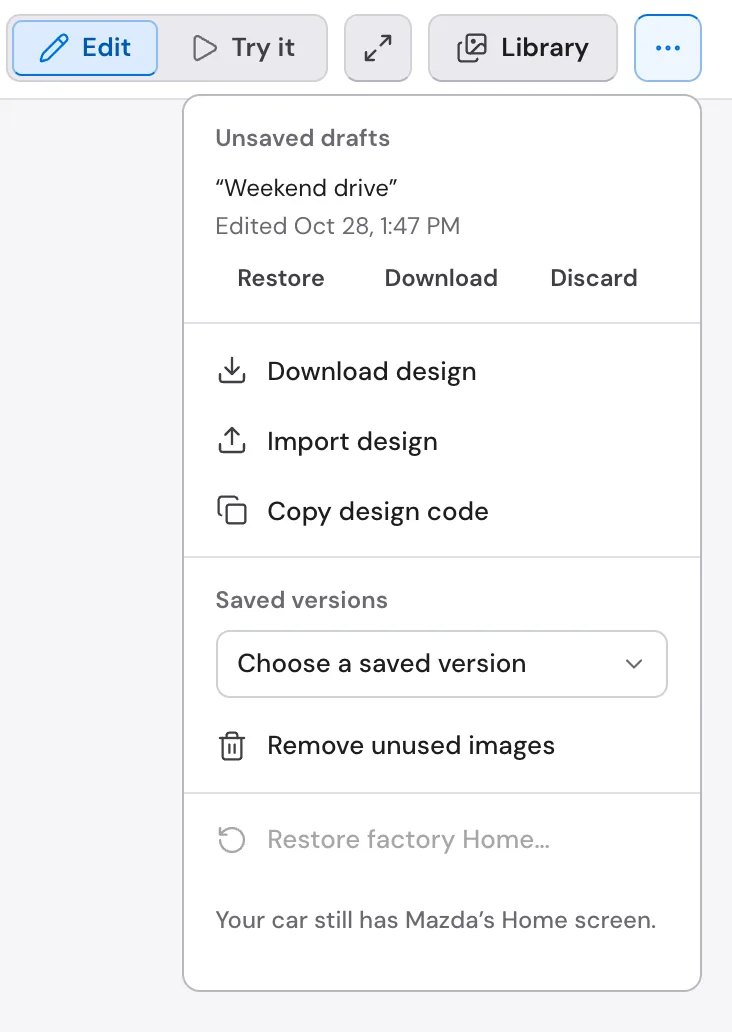
- Browser drafts: use Restore draft in the recovery notice, or open More → Unsaved drafts and choose Restore. Closing the notice leaves the draft under More. Review the restored design and select Save to store it online.
- Online versions: open More → Saved versions and choose a version. It opens as a browser draft. Select Save to make it the newest online version, then send it if you want to install it.
Opening an earlier version can replace unsaved edits; the editor asks first, and Undo brings them back. Discarding a browser draft does not delete your online design.
Browser recovery copies belong to that browser and design. They may be lost if browser storage is cleared or unavailable. Use Save for online storage, or More → Download design for an editable backup. Import design opens that backup in the editor. A design download is not an installable ScreenTune USB package.
What if the design changed in another tab?
Section titled “What if the design changed in another tab?”The editor will not overwrite a newer online save without warning. Saving asks This design was changed in another tab or device. Load the newer one opens the newer save; Keep mine saves your edits over it. If the dialog says your edits are kept in the browser, you can also restore them from More → Unsaved drafts later.
If saving still fails after Keep mine, the editor offers Download my edits to keep a copy, then Reload to see the newer design. Review the design before saving again.
If the browser says it cannot keep a recovery copy, download your work before reloading or closing the page.
Why can’t I move or restyle a button?
Section titled “Why can’t I move or restyle a button?”Round-button and panel themes keep their five Home shortcuts in place, and some fix button art or colors, to preserve their layout. Read the theme note beside the controls, or compare themes in the theme list. Illustrated scenes let you move and resize their shortcuts; use a blank style for a freely arranged design. See themes and shortcuts.
If a design cannot save because artwork or the design is too large, simplify it and use More → Remove unused images. If a menu cannot be reached, link it from a shortcut using Opens, then check the route in Try it.
Can I go back to Mazda’s factory Home?
Section titled “Can I go back to Mazda’s factory Home?”Yes. More → Restore factory Home… in the editor, or ⋯ → Restore factory Home… in My Home designs, requests a USB package that restores it while keeping your designs online. You must install that package in the car. See restore factory Home.