
Install, Repair, or Remove TouchTune
Your prepared TouchTune USB arrives ready to use. If you built your own from the free public source, finish the FAT32/MBR USB preparation first. The same drive remains the installer, repair tool, and uninstaller.
| What you see | What it does |
|---|---|
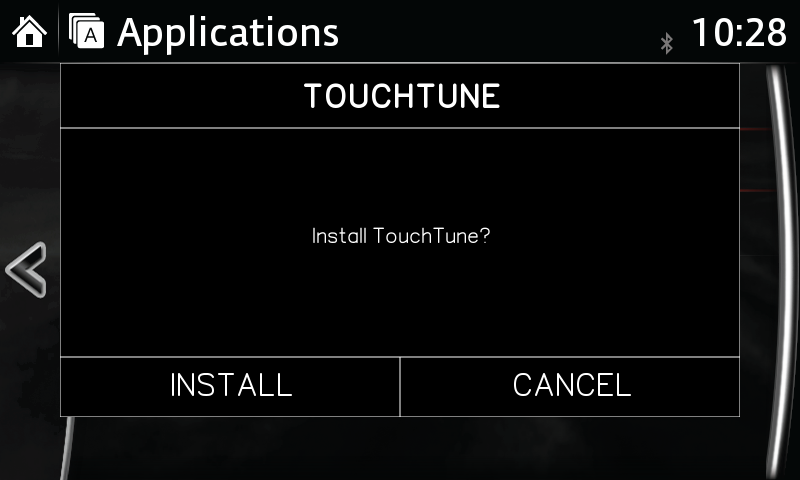
| INSTALL | Saves the original settings, then installs TouchTune. |
| REPAIR | Restores the saved baseline, then cleanly reapplies TouchTune. |
| REMOVE | Restores the original file and factory speed-lock settings. |
| CANCEL | Closes the prompt before any system changes. |
Check the firmware first
Section titled “Check the firmware first”TouchTune is for the Gen 6 Mazda Connect 74.00.324 build family. The About screen may
show 74.00.324 without the package’s A, including labels such as EU N, 4A N, or
JP M. That is normal. The installer reads the internal version, accepts only the exact
.324 base with an optional A patch field, and ignores the region/flavor prefix.
It rejects .311, .331, a different patch letter, an unreadable version, and newer
Mazda Connect generations before changing anything. See
how to check your firmware. The live bench validation
is on a North American .324A CMU; other regional .324 builds are eligible by firmware
identity but are not claimed as separately bench-tested.
Install TouchTune
Section titled “Install TouchTune”Start the engine or use stable ignition-on power. The action normally takes about two minutes.
- Wait for Mazda Connect to finish booting. Leave it on the home, Applications, or Settings screen.
- Insert the TouchTune drive directly into a media/data USB port. Do not use a hub, splitter, extension, or charge-only port.
- Wait for the TOUCHTUNE prompt, then select INSTALL.
- Leave the ignition on and the USB connected. Do not press buttons or remove the drive while TouchTune is working.
- Wait for Mazda Connect to reboot and return to its normal screen.
- Remove the USB and keep it somewhere safe.
What to expect afterward
Section titled “What to expect afterward”TouchTune does not add an app or menu item. Once installed, the native Mazda screens and Apple CarPlay accept touch while the vehicle is moving. The commander knob, steering-wheel buttons, and voice controls still work normally. Gen 6 Android Auto remains commander-only because Mazda did not connect its UI to the touchscreen.
The change survives normal restarts and ignition cycles. You do not plug the USB in for every drive.
Repair or remove it later
Section titled “Repair or remove it later”Insert the same USB after Mazda Connect finishes booting. An installed unit shows REPAIR, REMOVE, and CANCEL.
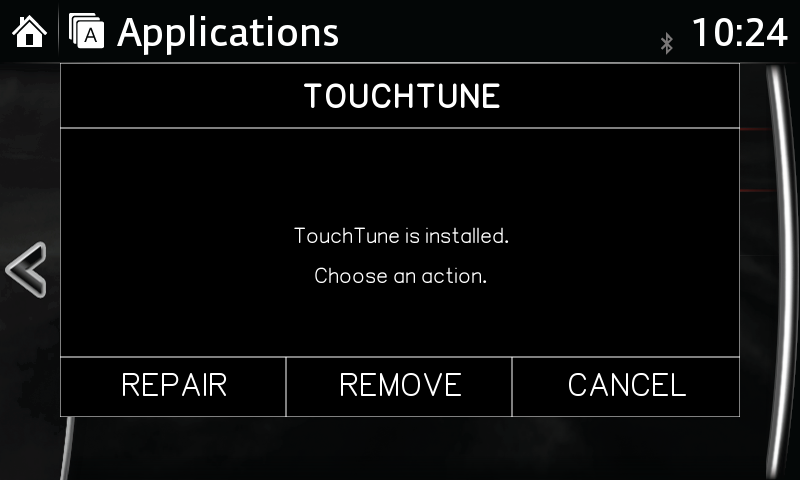
- Choose REPAIR if touch is still locked, a firmware service was reset, or support asks you to reapply the change. Repair restores the saved baseline first; it does not stack another patch on top.
- Choose REMOVE to return to the file and speed-lock settings saved before the first TouchTune install. Leave the USB connected until the automatic reboot finishes.
- Choose CANCEL if you opened the prompt by mistake. Nothing changes.
Keep the USB after either action. Its launcher intentionally stays on the drive so it can be reused without rebuilding it.
Fix a missing prompt or failed action
Section titled “Fix a missing prompt or failed action”| Result | What to do |
|---|---|
| No TouchTune prompt | Wait for the normal Mazda screen, try the other media USB port, then use USB not working. |
| Unsupported firmware | Recheck the complete About-screen version. The installer made no changes. |
| Prompt returns after a reboot | Select CANCEL, let Mazda Connect settle, then remove the reusable USB. |
| Touch is still locked | Insert the same drive and choose REPAIR. Test the native Mazda UI or CarPlay; Android Auto remains commander-only. |
| An error popup appears | Leave the unit powered, let the action finish, and copy touchtune.log from the USB before reformatting it. |
| REMOVE did not restore the expected behavior | Restart the vehicle once more, then follow revert and recovery options. |
For help, email hello@miatafy.com with the order email, a
photo of Settings → System → About, and touchtune.log from the USB. Those three
items usually identify the problem without another trip to the car.
Common post-purchase questions
Section titled “Common post-purchase questions”Do I need the USB connected while driving?
Section titled “Do I need the USB connected while driving?”No. TouchTune is a one-time persistent change. Remove the drive after the install reboot and store it for repair or removal.
My About screen says 74.00.324, not 74.00.324A. Is that okay?
Section titled “My About screen says 74.00.324, not 74.00.324A. Is that okay?”Yes. Mazda often omits the package’s A from the visible OS version. TouchTune accepts
the exact .324 base with no patch letter or with A; it still rejects every other
build.
Where is the TouchTune app?
Section titled “Where is the TouchTune app?”There is no app. The touchscreen simply stops locking when the car moves.
Can I undo it before selling the car?
Section titled “Can I undo it before selling the car?”Yes. Insert the same USB, choose REMOVE, and wait for the reboot. The saved original settings are restored.
What if I lose or erase the USB?
Section titled “What if I lose or erase the USB?”The installer is free and open source. You can make another drive from the TouchTune repository and the USB preparation guide. If you purchased a prepared drive and need help rebuilding it, email support.
Can I read or share the software?
Section titled “Can I read or share the software?”Yes. The software is public under GPL-3.0. The paid option is a tested physical USB and preparation help, not secret or locked software.
What happens after a Mazda firmware reinstall?
Section titled “What happens after a Mazda firmware reinstall?”A firmware reinstall can overwrite the TouchTune change. Confirm the resulting version
is still in the .324 family, then insert the USB and choose INSTALL or REPAIR as shown.
Do not run TouchTune on a different build just because it worked before the update.
I need to change my shipping address or ask about delivery
Section titled “I need to change my shipping address or ask about delivery”Reply to the order email or contact hello@miatafy.com as soon as possible. Include the name and email used at checkout. Product and return terms are on the Terms of Sale.